Advantages and Disadvantages of Mobile Phones
Published: 1 Nov 2026
Mobile phones have become an important part of modern life. People use them to communicate with family and friends, attend online classes, manage daily tasks, access information, and enjoy entertainment. Smartphones have also made many digital services available directly from our pockets.
However, mobile phones also have some disadvantages. Excessive use can affect sleep, concentration, and physical activity. They can also create privacy risks, distractions, and extra expenses.
Understanding the advantages and disadvantages of mobile phones helps us make better decisions about how we use them. In this article, I will explain major advantages and disadvantages of mobile phones, along with their common uses and practical tips.
Advantages of Mobile Phones
There are many advantages of mobile phones in daily life. They help people stay connected, access information, manage responsibilities, and complete different tasks without needing a computer.
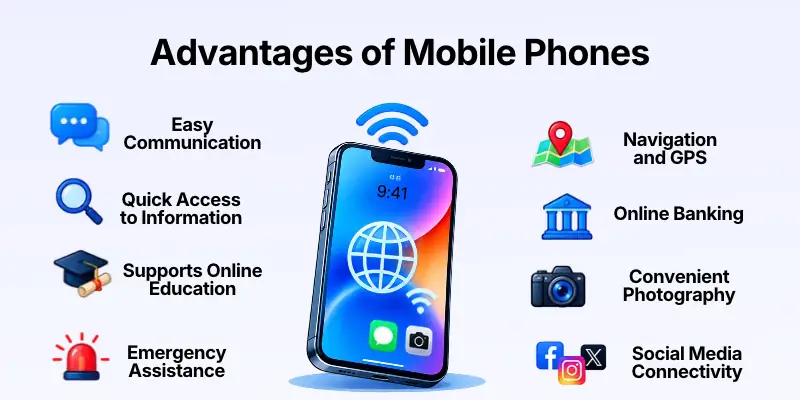
The following are important advantages of mobile phones.
- Easy Communication
- Quick Access to Information
- Supports Online Education
- Easy Internet Access
- Emergency Assistance
- Navigation and GPS
- Online Banking
- Convenient Photography
- Entertainment on the Go
- Social Media Connectivity
- Supports Remote Work
- Online Shopping
- Time Management
- Digital Payments
- Health and Fitness Tracking
- Language Translation
- File Sharing
- Business Communication
- Access to Digital Services
- Portability and Convenience
Let’s discuss these points in detail.
1. Easy Communication
One of the biggest advantages of mobile phones is that they make communication easier. People can call family members, send text messages, and talk to friends without needing to stay in one place.
Smartphones also support video calls and messaging applications. These features are useful for people who live far from their loved ones or need to communicate quickly for work and study.
Mobile phones make communication easier through:
- Voice calls
- Text messages
- Video calls
- Instant messaging
- Group conversations
Stay Connected: Choose suitable communication methods and protect your personal details when contacting unfamiliar people.
2. Quick Access to Information
Mobile phones allow users to search for information whenever they need it. They can look up definitions, read news, check facts, and find answers to everyday questions within a short time.
This access is useful for students, professionals, and people who want to learn new skills. However, not every online source is reliable, so users should check important information before trusting it.
Mobile phones help users find:
- Educational information
- News and updates
- Word meanings
- Tutorials and guides
- Official websites and documents
Check Your Sources: Use trustworthy websites and compare information when accuracy matters.
3. Supports Online Education
Mobile phones make learning more accessible by allowing students to watch educational videos, join online classes, read digital notes, and communicate with teachers.
Students can also use learning applications to practice languages, revise lessons, and prepare for exams. However, notifications and entertainment applications can distract them during study time.
Mobile phones support education through:
- Online lectures
- Digital textbooks
- Educational applications
- Practice quizzes
- Communication with teachers
Study with Focus: Turn off unnecessary notifications and use educational applications during dedicated study sessions.
4. Easy Internet Access
Smartphones allow people to browse the internet without needing a desktop computer or laptop. With a suitable network or Wi-Fi connection, users can access websites, email, online platforms, and digital resources.
This convenience is especially helpful when people are travelling or away from home. However, mobile data may be limited, and internet access can be unreliable in some areas.
Mobile phones provide internet access for:
- Browsing websites
- Checking emails
- Using online services
- Reading digital content
- Accessing cloud applications
Manage Data Usage: Connect to trusted Wi-Fi when suitable and monitor your mobile data consumption.
5. Emergency Assistance
Mobile phones can help people contact emergency services, family members, or trusted contacts when urgent situations arise. They are particularly useful when someone needs help while travelling or away from home.
Depending on the device and local network, features such as location sharing and emergency calling may provide additional support. However, these features should not be treated as a guarantee that help will always be available.
Mobile phones can assist during emergencies by:
- Calling emergency services
- Contacting family members
- Sharing a location
- Sending urgent messages
- Accessing emergency information
Prepare in Advance: Save important contacts and learn how emergency calling works in your area.
6. Navigation and GPS
Mobile phones can help users find places and plan routes through maps and navigation applications. These tools can provide directions, estimated travel times, and information about nearby locations.
Navigation is useful for daily commuting, travel, and finding unfamiliar destinations. However, directions may be affected by poor connectivity, outdated maps, or changing road conditions.
Navigation applications can help users:
- Find nearby places
- Plan driving routes
- Check estimated travel times
- Locate public services
- Share travel locations
Travel Carefully: Check directions before moving and never let navigation distract you while driving.
7. Online Banking
Many banks offer mobile applications that allow customers to manage selected banking services from their phones. Depending on the bank, users may check balances, review transactions, transfer money, and pay bills.
These services can reduce the need to visit a bank branch for routine tasks. However, users must protect their banking information and be cautious of fake applications or fraudulent messages.
Mobile banking can help users:
- Check account balances
- Review transaction histories
- Transfer funds
- Pay selected bills
- Receive account notifications
Protect Your Banking Details: Use your bank’s official application and never share passwords or verification codes with others.
8. Convenient Photography
Mobile phones allow people to capture photographs and videos without carrying a separate camera. Many smartphones offer editing tools and features that make it easy to improve and share images.
This is useful for personal memories, school projects, social media content, and small business marketing. However, image quality varies by device and shooting conditions.
Mobile phone cameras can be used for:
- Capturing family photographs
- Recording videos
- Scanning documents
- Creating social media posts
- Photographing products
Capture Responsibly: Respect other people’s privacy and ask permission before sharing sensitive photographs.
9. Entertainment on the Go
Mobile phones provide access to entertainment in different places. Users can listen to music, watch videos, play games, read digital books, and explore other forms of online content.
This can make travel and free time more enjoyable. However, spending too much time on entertainment may affect studies, work, sleep, and personal relationships.
Mobile phones offer entertainment through:
- Music and podcasts
- Online videos
- Mobile games
- Digital books
- Streaming applications
Keep a Balance: Enjoy entertainment without allowing it to interfere with important responsibilities or sleep.
10. Social Media Connectivity
Mobile phones make social media platforms accessible throughout the day. Users can share updates, communicate with friends, follow interests, and participate in online communities.
Social media can also help students, creators, and businesses reach audiences. However, misleading content, online harassment, and excessive scrolling are possible disadvantages.
Mobile phones support social media activities such as:
- Sharing photographs
- Posting updates
- Joining online communities
- Communicating with followers
- Promoting products and services
Use Social Media Wisely: Review privacy settings and avoid sharing information that should remain private.
11. Supports Remote Work
Mobile phones help people manage certain work activities away from their offices. They can respond to emails, join online meetings, review documents, and communicate with colleagues.
This flexibility is helpful for workers who travel or need to stay connected while away from a computer. However, some professional tasks require a larger screen, specialized software, or a secure work environment.
Mobile phones support remote work through:
- Email communication
- Online meetings
- Work messaging
- Calendar management
- Reviewing shared documents
Choose the Right Device: Use a computer when a task requires advanced software or detailed editing.
12. Online Shopping
Mobile phones allow users to browse products, compare prices, read reviews, and place orders through shopping applications and websites.
This convenience can save time and provide access to products from different sellers. However, fake stores, misleading advertisements, and unsafe payment pages can create risks.
Mobile phones make online shopping easier through:
- Browsing product listings
- Comparing prices
- Reading customer reviews
- Tracking orders
- Contacting sellers
Shop Safely: Check seller credibility, product details, return policies, and payment security before ordering.
13. Time Management
Mobile phones include tools that help users organize their daily routines. Calendars, alarms, reminders, and note-taking applications can help people remember appointments and plan their work.
These tools are useful for students managing assignments and workers handling deadlines. However, excessive notifications may interrupt concentration instead of improving productivity.
Mobile phones can support time management through:
- Setting alarms
- Creating reminders
- Managing calendars
- Writing to-do lists
- Tracking appointments
Plan Your Day: Use reminders for important tasks and disable notifications that do not need immediate attention.
14. Digital Payments
Mobile phones support different digital payment methods, depending on the user’s country, bank, and available services. These may include mobile wallets, QR-code payments, and contactless payments on compatible devices.
Digital payments can make everyday purchases more convenient and reduce the need to carry cash. However, users should understand transaction fees and protect their payment accounts.
Mobile payments can help users:
- Pay participating merchants
- Transfer money
- Review payment records
- Receive transaction alerts
- Manage supported digital wallets
Confirm Every Payment: Check the recipient and amount before approving a transaction.
15. Health and Fitness Tracking
Mobile phones can support healthy routines through fitness applications, activity tracking, medication reminders, and tools for recording selected health information.
Some devices can connect with wearables to track activities such as steps, workouts, or sleep estimates. These features may support personal awareness, but they do not replace professional medical assessment.
Mobile phones can help users:
- Record physical activity
- Track workout sessions
- Set movement reminders
- Maintain health notes
- Monitor selected wellness trends
Use Health Tools Carefully: Treat app measurements as estimates and seek qualified medical advice when needed.
16. Language Translation
Mobile phones provide access to translation applications that can help users understand words, sentences, and conversations in different languages.
These tools are useful for travel, study, and communicating with people who speak other languages. However, translations may miss cultural meaning, idioms, or context.
Translation tools can assist with:
- Translating text
- Understanding unfamiliar words
- Practicing vocabulary
- Translating selected speech
- Reading foreign-language content
Check Important Translations: Ask a fluent speaker or qualified translator to review wording when accuracy is essential.
17. File Sharing
Mobile phones allow users to send and receive photographs, documents, videos, and other digital files. Depending on the device and application, files can be shared through messaging, email, nearby sharing, or cloud services.
This is useful for school assignments, business documents, and personal communication. However, large files may use significant data, and sharing sensitive information can create privacy risks.
Mobile phones support file sharing through:
- Email attachments
- Messaging applications
- Cloud storage links
- Nearby sharing features
- Document-sharing services
Share Carefully: Check the recipient and file permissions before sending private documents.
18. Business Communication
Mobile phones help business owners communicate with customers, employees, suppliers, and business partners. Calls, messaging applications, email, and business tools make it easier to respond to questions and coordinate tasks.
Small businesses can also use phones to manage orders, promote products, and maintain customer relationships. However, excessive work messages may blur the boundary between personal time and business responsibilities.
Mobile phones can support business communication through:
- Responding to customer enquiries
- Coordinating with employees
- Confirming orders
- Sharing product information
- Managing business appointments
Maintain Professional Communication: Respond clearly and protect confidential business information.
19. Access to Digital Services
Many organizations provide services through mobile-friendly websites and applications. Users may be able to book appointments, check delivery information, access travel services, and complete selected administrative tasks.
These services can make everyday activities more convenient, although not every service is available in every region or on every device.
Mobile phones can provide access to:
- Appointment booking
- Delivery tracking
- Travel reservations
- Online forms
- Customer support services
Use Official Platforms: Download applications from trusted sources and verify website addresses before entering personal details.
20. Portability and Convenience
Unlike desktop computers, mobile phones are designed to be carried easily. Their compact size allows people to communicate, take notes, capture photographs, and access digital services while away from home.
This portability makes mobile phones useful for students, travellers, workers, and people who need quick access to information. However, smaller screens and keyboards may be less suitable for lengthy or complex tasks.
Mobile phones offer portability through:
- Lightweight design
- Easy transportation
- Quick access to applications
- On-the-go communication
- Convenient everyday use
Choose for Your Needs: Consider battery life, screen size, storage, and durability before buying a phone.
Disadvantages of Mobile Phones
Although mobile phones offer many benefits, they also have disadvantages that can affect health, productivity, privacy, and finances. The effects often depend on how frequently people use their devices and which activities they perform.
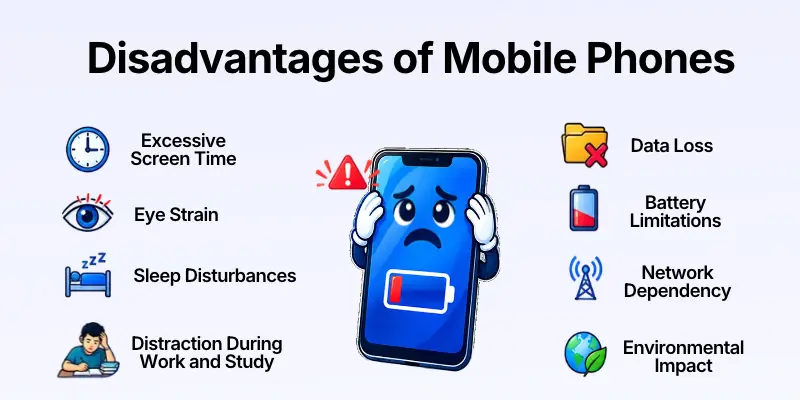
The following are 20 important disadvantages of mobile phones.
- Excessive Screen Time
- Eye Strain
- Sleep Disturbances
- Distraction During Work and Study
- Mobile Phone Addiction
- Privacy Risks
- Cybersecurity Threats
- Cyberbullying
- Reduced Face-to-Face Communication
- Physical Discomfort
- Road Safety Risks
- Unnecessary Expenses
- Spread of False Information
- Reduced Concentration
- Social Comparison
- Data Loss
- Battery Limitations
- Network Dependency
- Environmental Impact
- Risk of Theft or Damage
Let’s discuss these points in detail
1. Excessive Screen Time
Using a mobile phone for long periods can reduce the time available for exercise, study, work, and in-person activities. It may also make it harder for some people to manage their daily schedules.
The effect depends on what users do on their phones and how that use fits into their lives. Educational work and necessary communication are different from hours of unplanned scrolling.
Excessive screen time may contribute to:
- Less time for physical activity
- Delayed daily responsibilities
- Fewer offline activities
- Longer periods of sitting
- Difficulty maintaining routines
Set Healthy Limits: Review your screen time and schedule regular breaks from nonessential phone use.
2. Eye Strain
Looking at a mobile screen for long periods may cause digital eye strain. Some users experience tired eyes, dryness, headaches, or temporary difficulty focusing.
Small text, glare, poor lighting, and prolonged close-up viewing may make discomfort worse. Adjusting display settings and taking breaks can help reduce strain.
Eye discomfort may include:
- Dry eyes
- Tired eyes
- Temporary blurred vision
- Headaches
- Difficulty focusing
Rest Your Eyes: Increase text size when needed, reduce glare, and take regular breaks from the screen.
3. Sleep Disturbances
Using a mobile phone late at night can interfere with a healthy sleep routine. Notifications, exciting content, and prolonged browsing may delay bedtime and make it harder to relax.
Bright screens can also affect the body’s normal sleep timing, particularly when exposure occurs close to bedtime. Individual effects vary, but setting a nighttime routine can help.
Phone use before bed may lead to:
- Later bedtimes
- Interrupted sleep from notifications
- Difficulty winding down
- Less time available for sleep
- Tiredness the following day
Protect Your Sleep: Reduce phone use before bedtime and silence nonessential notifications at night.
4. Distraction During Work and Study
Mobile phones provide constant access to messages, games, social media, and other applications. These activities can interrupt concentration when someone is trying to study or complete an important task.
Frequent interruptions may also make it harder to return to the original activity. Keeping the phone out of reach during focused work can reduce unnecessary distractions.
Common distractions include:
- Incoming messages
- Social media alerts
- Mobile games
- Unrelated videos
- Frequent application switching
Focus on One Task: Silence unnecessary notifications and check your phone during planned breaks.
5. Mobile Phone Addiction
Some people find it difficult to control their phone use even when it interferes with daily responsibilities. They may repeatedly check notifications or continue scrolling longer than intended.
Problematic phone use can affect sleep, relationships, concentration, and personal routines. Not everyone who uses a phone frequently has an addiction, but loss of control can be a warning sign.
Excessive phone use may involve:
- Constantly checking notifications
- Difficulty stopping an activity
- Neglecting responsibilities
- Using the phone late at night
- Feeling uncomfortable without the device
Build Better Habits: Set realistic usage limits and replace some phone activities with offline hobbies or social activities.
6. Privacy Risks
Mobile phones often contain personal photographs, messages, contact lists, location information, and account details. If this information is shared carelessly or accessed without permission, users may face privacy problems.
Some applications request access to data that is not necessary for their main function. Reviewing permissions can help users understand and control how their information is used.
Privacy risks may include:
- Exposure of private photographs
- Unnecessary location sharing
- Access to personal contacts
- Collection of sensitive information
- Unauthorized access to messages
Protect Your Privacy: Review application permissions and avoid sharing sensitive information with untrusted services.
7. Cybersecurity Threats
Mobile phones can be targeted by malicious applications, phishing messages, fake websites, and attempts to steal account information. A compromised phone may expose personal data or create financial risks.
Users may be more vulnerable when they install applications from untrusted sources or ignore security updates. Safe browsing and careful account management can reduce many common threats.
Security risks may include:
- Fake application downloads
- Phishing links
- Account theft
- Malicious software
- Fraudulent payment requests
Secure Your Phone: Install updates, use a screen lock, and download applications from trusted sources.
8. Cyberbullying
Mobile phones allow people to communicate instantly, but this can also make online harassment easier. Hurtful messages, threats, embarrassing images, or repeated unwanted contact may affect a person’s confidence and well-being.
Cyberbullying can happen through social media, messaging applications, gaming platforms, and other online services. Users should know how to block, report, and document harmful behaviour.
Cyberbullying may involve:
- Abusive messages
- Threatening comments
- Sharing private images
- Spreading rumours
- Repeated unwanted contact
Respond Safely: Save relevant evidence, block the person when appropriate, and seek help from a trusted adult or relevant authority if necessary.
9. Reduced Face-to-Face Communication
Using a phone during meals, meetings, or conversations can reduce attention to the people nearby. When this happens regularly, it may affect the quality of personal relationships.
Mobile phones can also help people maintain long-distance relationships, so the effect depends on how they are used. Making time for direct conversations helps maintain social connections.
Excessive phone use may result in:
- Less attention during conversations
- Interrupted family time
- Fewer shared activities
- Misunderstandings between people
- Reduced in-person interaction
Give People Your Attention: Put your phone aside during important conversations and shared activities.
10. Physical Discomfort
Holding a phone for long periods or bending the neck to look at the screen can cause discomfort in the neck, shoulders, hands, and wrists.
Poor posture and repeated movements may contribute to muscle strain, especially during extended use. Changing position and taking breaks can help reduce discomfort.
Physical problems may include:
- Neck stiffness
- Shoulder discomfort
- Wrist strain
- Hand fatigue
- Back discomfort from poor posture
Use Comfortable Posture: Hold your phone at a comfortable height and change position regularly.
11. Road Safety Risks
Using a mobile phone while driving can distract attention from the road. Reading messages, typing, or handling a phone may increase the risk of accidents.
Pedestrians and cyclists can also be distracted when looking at screens near traffic. Safety should always come before checking a notification or answering a message.
Phone-related road risks include:
- Reduced attention while driving
- Delayed reactions
- Missed road signals
- Distracted walking near traffic
- Increased accident risk
Put Safety First: Never handle your phone while driving. Stop in a safe place before using it.
12. Unnecessary Expenses
Mobile phones can create ongoing expenses beyond the original purchase. These may include mobile data, calling packages, accessories, repairs, paid applications, and device upgrades.
Frequent upgrades can become costly when the existing phone still meets the user’s needs. Comparing prices and reviewing subscriptions can help control spending.
Phone-related expenses may include:
- Monthly data packages
- Repair costs
- Protective accessories
- Paid application subscriptions
- Replacement devices
Manage Your Budget: Compare available packages and avoid paying for features or subscriptions you rarely use.
13. Spread of False Information
Mobile phones make it easy to share news, images, videos, and messages quickly. However, false or misleading information can spread just as easily as accurate information.
Users may encounter edited images, misleading headlines, fake announcements, or rumours shared through messaging groups. Checking the original source before forwarding content can help reduce the spread of misinformation.
False information may involve:
- Misleading health advice
- Fake news stories
- Edited photographs
- Fraudulent announcements
- Unverified rumours
Verify Before Sharing: Check reliable sources and avoid forwarding information simply because it appears convincing.
14. Reduced Concentration
Frequent phone checking can interrupt attention and make it harder to stay focused on demanding tasks. Even when users are not actively using an application, expecting notifications may distract them.
This can affect reading, studying, problem-solving, and work that requires sustained attention. Reducing interruptions can make focused activities easier.
Concentration problems may involve:
- Frequent task switching
- Interrupted reading
- Difficulty completing assignments
- Forgetting task details
- Reduced focus during meetings
Create Focus Time: Keep your phone on silent or away from your workspace when completing important tasks.
15. Social Comparison
Social media on mobile phones often shows carefully selected photographs, achievements, and lifestyle updates. Comparing everyday life with these idealized posts may make some users feel dissatisfied or under pressure.
Online content does not always show the full picture of another person’s life. Limiting unhealthy comparisons and choosing positive online communities can help users maintain a more balanced perspective.
Social comparison may lead to:
- Unrealistic expectations
- Pressure to look a certain way
- Dissatisfaction with personal progress
- Worry about online approval
- Negative feelings after browsing
Use Social Media Mindfully: Follow accounts that provide value and take breaks from content that regularly makes you feel worse.
16. Data Loss
Important files, photographs, messages, and contacts can be lost if a phone is damaged, stolen, reset, or affected by a software problem. Losing access may be especially difficult when no backup exists.
Some data may be recoverable, but recovery is not guaranteed. Backing up important information can make it easier to restore files when a problem occurs.
Data loss may affect:
- Personal photographs
- Contacts
- Messages
- School documents
- Work-related files
Back Up Important Data: Use a trusted backup method and check that essential files can be restored.
17. Battery Limitations
Mobile phones depend on battery power, and heavy use can drain a battery quickly. Video streaming, gaming, navigation, and some background applications may consume more energy than basic tasks.
Battery performance also changes with age, temperature, and usage patterns. A low battery can limit access to communication and other services when a charger is unavailable.
Battery-related problems may include:
- Frequent charging
- Shorter battery life over time
- Unexpected shutdowns
- Limited use during travel
- Reduced performance from an aging battery
Manage Battery Use: Adjust screen brightness, review battery-consuming applications, and carry suitable charging equipment when needed.
18. Network Dependency
Many mobile phone features require a cellular or Wi-Fi connection. Weak signals, network outages, or limited coverage can interrupt calls, messages, browsing, and online applications.
Some features, such as offline notes and downloaded files, may still work without a connection. Saving essential information in advance can help when network access is unreliable.
Network problems may cause:
- Dropped calls
- Delayed messages
- Slow browsing
- Interrupted online classes
- Inaccessible online services
Prepare for Poor Coverage: Save important information offline and identify alternative ways to communicate when necessary.
19. Environmental Impact
Mobile phone production requires materials, energy, packaging, and manufacturing processes. Frequent replacement also contributes to electronic waste when old devices are discarded improperly.
Phones contain components that require responsible handling at the end of their useful life. Repairing a device, keeping it longer, or using approved recycling services can help reduce waste.
Environmental concerns include:
- Electronic waste
- Use of manufacturing materials
- Energy consumption
- Packaging waste
- Improper disposal of old devices
Reduce Electronic Waste: Maintain your phone, consider repair where practical, and recycle old devices through suitable services.
20. Risk of Theft or Damage
Because mobile phones are carried frequently, they can be lost, stolen, dropped, or damaged by water. A damaged or missing phone may create repair expenses and interrupt access to important information.
The risk can be reduced through careful handling and suitable security settings. However, protective accessories cannot guarantee that a device will never be damaged.
Common risks include:
- Screen damage
- Water damage
- Theft in public places
- Accidental loss
- Unauthorized access after theft
Protect Your Device: Use a suitable case, enable device-locking features, and keep important data backed up.
Common Uses of Mobile Phones
Mobile phones are used for many personal, educational, and professional activities. Their exact features depend on the device and the services available to the user.
| Field | Common Uses |
| Communication | Calls, messages, video calls |
| Education | Online classes, digital notes, quizzes |
| Business | Customer communication, email, scheduling |
| Banking | Account management, transfers, bill payments |
| Photography | Pictures, videos, document scanning |
| Navigation | Maps, directions, location sharing |
| Entertainment | Music, games, videos, digital books |
| Shopping | Product research, ordering, delivery tracking |
| Healthcare | Fitness tracking, appointment reminders |
| Social Media | Sharing updates, connecting with communities |
Factors to Consider Before Buying a Mobile Phone
Choosing a suitable mobile phone depends on your budget, daily needs, and preferred features. Consider the following factors before making a purchase.
1. Budget: Set a realistic budget and compare devices within that range. Remember to consider accessories, data packages, repairs, and other ongoing costs.
2. Battery Life: Choose a phone that can support your daily usage. Battery performance varies with screen brightness, network conditions, applications, and battery age.
3. Storage Capacity: Consider how many photographs, videos, applications, and documents you plan to keep. Larger storage may be useful if you regularly record videos or download large files.
4. Camera Quality: If you take photographs or create social media content, compare camera performance in different lighting conditions. Do not judge quality by megapixels alone.
5. Performance: Look for a processor and memory configuration that can handle your preferred applications. Gaming, editing, and multitasking may require stronger hardware than basic communication.
6. Display Size and Quality: Consider screen size, resolution, brightness, and readability. A larger display may be helpful for reading, while a smaller phone may be easier to carry.
7. Security and Software Updates
Choose a phone with suitable security features and a clear software-update policy. Updates help maintain compatibility and address known security problems.
8. Durability and Repair: Check build quality, warranty coverage, and the availability of repair services. A durable device may help reduce replacement costs.
Common Mistakes to Avoid When Using a Mobile Phone
Responsible phone habits can improve safety, privacy, and productivity. Avoid these common mistakes.
- Ignoring software updates: Install suitable updates to improve security and compatibility.
- Using weak passwords: Protect important accounts with strong, unique passwords.
- Installing untrusted applications: Download apps from reliable sources.
- Sharing too much personal information: Review what you post and who can access it.
- Ignoring backups: Keep copies of important photographs and documents.
- Using your phone while driving: Stop safely before checking messages or calls.
- Spending too much time scrolling: Set limits for nonessential applications.
- Ignoring battery health: Avoid unnecessary heat and follow the manufacturer’s charging guidance.
How to Use a Mobile Phone Properly
Following a few simple habits can help you get more value from your phone while reducing common risks.
- Set a screen lock: Use a PIN, password, or suitable biometric feature.
- Keep software updated: Install security and application updates when appropriate.
- Review application permissions: Allow access to personal information only when needed.
- Back up important files: Save essential photographs, contacts, and documents.
- Manage notifications: Turn off alerts that interrupt your work or study.
- Take regular breaks: Avoid staying in one position while using your phone for long periods.
- Use trusted networks: Be cautious when entering sensitive information on public Wi-Fi.
- Balance screen time: Make time for sleep, exercise, study, and face-to-face communication.
Quick Comparison: Advantages vs. Disadvantages of Mobile Phones
| Advantages of Mobile Phones | Disadvantages of Mobile Phones |
| Make communication easier | Can interrupt work and study |
| Provide quick access to information | May spread false information |
| Support online education | Can create distractions |
| Offer easy internet access | Depend on network availability for many services |
| Help during emergencies | May be lost or stolen |
| Provide navigation and maps | Can distract road users |
| Support online banking | Can expose users to fraud |
| Make photography convenient | Can create privacy concerns |
| Provide entertainment | Excessive use may affect daily routines |
| Connect people through social media | May encourage unhealthy comparisons |
Final Thoughts
Mobile phones have made communication, education, banking, navigation, and everyday tasks more convenient. Their portability allows people to access useful tools and services from almost anywhere.
However, mobile phones also have disadvantages, including excessive screen time, distractions, privacy risks, cybersecurity threats, and unnecessary expenses. These problems can affect people differently depending on their habits and the way they use their devices.
The best approach is to use mobile phones with a clear purpose and maintain a healthy balance between online and offline activities. By protecting personal information, checking online content, and managing screen time, users can enjoy the benefits of mobile phones while reducing their risks.
Frequently Asked Questions (FAQs)
Now, let’s explore some frequently asked questions
1. What are the main advantages of mobile phones?
The main advantages include easy communication, internet access, online education, navigation, digital payments, photography, and access to many useful services.
2. What are the main disadvantages of mobile phones?
The main disadvantages include excessive screen time, eye strain, sleep disturbances, distractions, privacy risks, cybersecurity threats, and unnecessary expenses.
3. Why are mobile phones important for students?
Mobile phones help students attend online classes, access educational resources, communicate with teachers, prepare notes, and practice different skills.
4. Can mobile phones affect sleep?
Yes. Late-night use, notifications, and engaging content can delay bedtime and disturb sleep routines. Reducing phone use before bed may help.
5. How can I use my mobile phone safely?
Keep your software updated, use a secure screen lock, download trusted applications, protect private information, and be careful with links and payment requests.
6. Are mobile phones useful for business?
Yes. They help business owners communicate with customers, manage emails, track orders, schedule appointments, and use online business services.
7. Can mobile phones help in emergencies?
They can help users contact emergency services, call trusted people, and share their location where supported. Availability depends on network coverage, device condition, and local emergency services.
8. How can I reduce mobile phone distractions?
Silence unnecessary notifications, set application time limits, keep your phone away during focused work, and check messages during planned breaks.
9. What should I consider before buying a mobile phone?
Consider your budget, battery life, storage, camera quality, performance, display, software support, durability, and repair options.
10. How can I protect my personal information on a mobile phone?
Use strong passwords, review application permissions, enable available security features, avoid suspicious links, and back up important information regularly.



- Be Respectful
- Stay Relevant
- Stay Positive
- True Feedback
- Encourage Discussion
- Avoid Spamming
- No Fake News
- Don't Copy-Paste
- No Personal Attacks
- Be Respectful
- Stay Relevant
- Stay Positive
- True Feedback
- Encourage Discussion
- Avoid Spamming
- No Fake News
- Don't Copy-Paste
- No Personal Attacks
